Exported SalesCodeMapping SKUs Structure
Overview
SalesCodeMapping data is very hard and time consuming to be edited in large amounts which is usually the case. As an improvement we introduce the possibility to export and import the sales code mapping data as a text file.
Here is a part and its properties as an example reference.
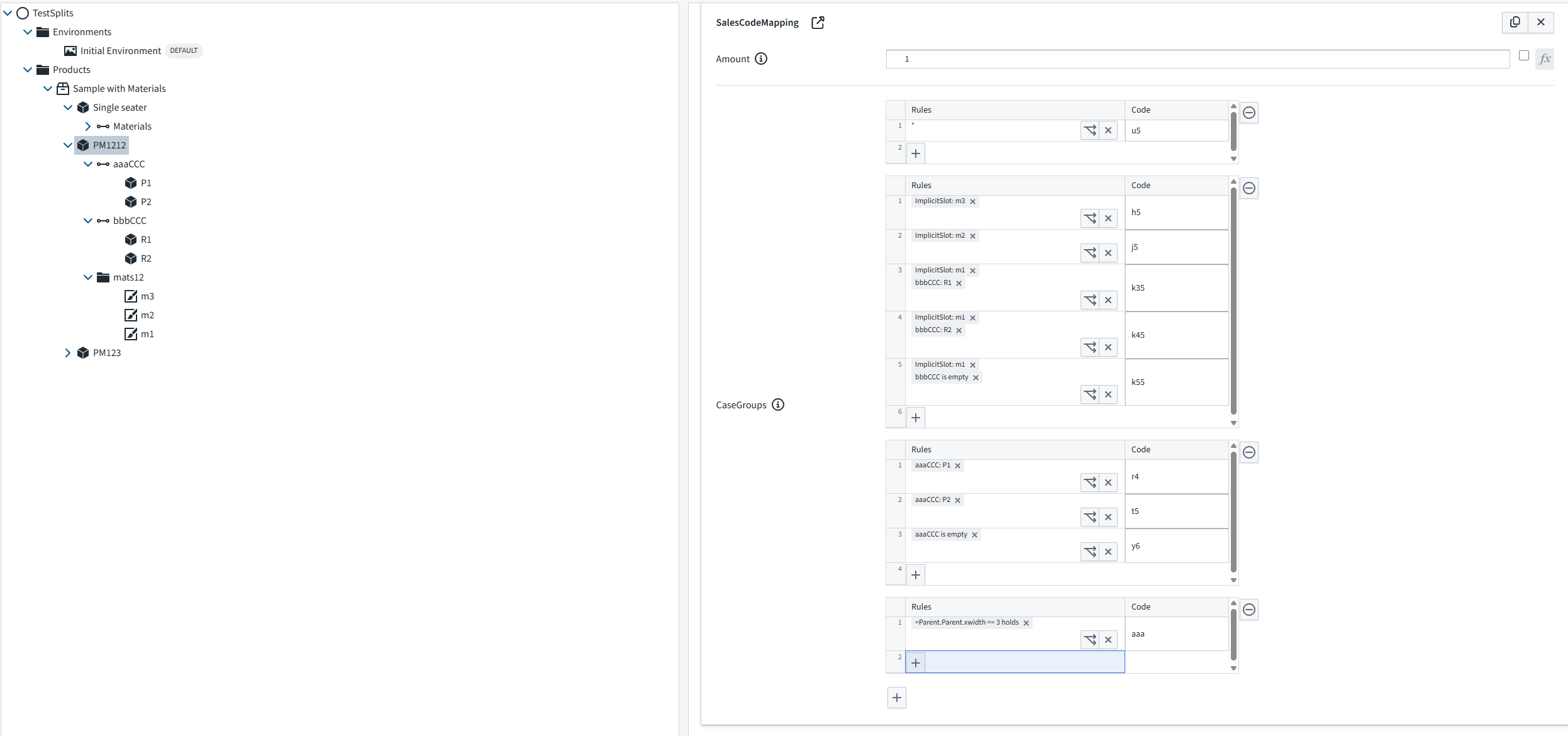
And here is the output file:
Available splits section.
This part has only the role of exposing to the user the available options for each element. This section is ignored when importing.
Header specifies the name of the product item: "PM1212" [Available Splits for: PM1212]
The Next section shows the slot name and the options below that slot. They can be material or accesory slots. The option 1..n can be a part or a material.
slot_name [Options] option 1..n
Example: aaaCCC [Options] : P1 : P2
OBS: The boolean splits are excluded.
Parents.
These are the parent product items where the SalesCodeMapping reside. Sub sections are the Id, the Amount and the CaseGroup(s).
An item with several SalesCodeMappings is exported as several [Parent: ...] sections, one per mapping. The "Available splits" section is written only once per item.
Id
[Parent: name_of_the_product_item] Id: guid
The optional Id: line directly after the [Parent: ...] line identifies the SalesCodeMapping. The export always writes it. When importing, the id decides which mapping is updated.
Example:
[Parent: PM1212] Id: 3f2b8c1e-5d4a-4e7b-9a61-2c8d0e4f7a19 Amount: 1
Import rules
The rules apply per [Parent: ...] section and per target item. Only the Amount and the case groups of a mapping are replaced; its id, measurand and tags are kept.
| Id line in the section | Item state | Result |
|---|---|---|
| Valid GUID found on the item | - | That mapping is updated in place. |
| Valid GUID not found on the item | - | A new mapping is created with that id, so importing the same file again updates it instead of adding another. |
Present but empty or not a GUID (for example Id: or Id: new) |
- | A new mapping is created with a new id. |
| No Id line | The item has exactly one mapping | That mapping is updated in place. |
| No Id line | The item has no mapping or several mappings | A new mapping is created with a new id. |
If the section has a valid id that belongs to one or more items in the imported branch, only those items are updated and the name after [Parent: ...] is just a label. Otherwise every item whose name matches the [Parent: ...] name is updated. New mappings are added after the existing ones.
Amount
The amount is written on one line after the optional Id: line. The value is a number or a script. A leading "=" sign is optional.
Amount: script or double
Examples:
[Parent: PM1212] Id: 3f2b8c1e-5d4a-4e7b-9a61-2c8d0e4f7a19 Amount: 1
[Parent: PM1212] Amount: =this.Size.X
Case ids
Case: sku_value_A Id: guid
Each case has an Id: line directly after its Case: line. The export always writes it. The id keeps the SKU texts of the case when the file is imported. The line contains no texts.
This is not the same as the Id: line of the mapping, which comes after the [Parent: ...] line and works as described above.
Example:
[CaseGroup 1 ] Case: u5 Id: 7c1d9a52-0b3e-4f6a-8d27-5e9b1a3c4d60 [*]
When importing, each case is matched to an existing case of the mapping in this order:
- By its id.
- By its code and mask.
- By its position in the group, when the group has the same number of cases as before.
A case that matches keeps its id and its SKU texts. So you can change the order of the cases in the file or edit a code without losing the texts. A case without an Id: line, for example one you add by hand, gets a new id and has no texts. A case that is removed from the file is removed from the mapping together with its texts.
Files that were exported before case ids existed have no Id: lines. They still import: the cases are matched by code and mask, and then by position.
An Id: line that is empty or is not a valid GUID rejects the whole file. Nothing is changed.
Case groups
Case groups can be many and they start with the "CaseGroup" The index_nr does not do anything nor it is required, it is just generated at export time to mark the case groups order.
Under each CaseGroup we can have multiple "Cases" Under each case we can have multiple lines.
Material and accesory slots: In each line there is a pair: slot name and the option name separated by ",". There can be multiple slot names under the same case. Of course, the options must be part of the slots. In case of no option selected, you can use "is empty" string.
Special case: when all options should be available use "[*]"
Example:
[CaseGroup 1 ] Case: u5 [*]
Boolean slots: In case we want to use Boolean slots, we need to add in front of the pair the string "[Bool]" The boolean_expression can have or not the leading "=" sign. The boolean_option_value is usually, "holds" or "does not hold"
[CaseGroup index_nr ]
Case: sku_value_A slot_name_1, option_name_1_1 slot_name_1, option_name_1_2 ... slot_name_2, option_name_2_1 slot_name_2, option_name_2_2 ...
Case: sku_value_B slot_name_1, option_name_1_1 slot_name_1, option_name_1_2 ... slot_name_2, option_name_2_1 slot_name_2, option_name_2_2 ...
[Bool] boolean_expression, boolean_option_value ...
Examples:
[CaseGroup 2 ] Case: h5 ImplicitSlot, m3 Case: j5 ImplicitSlot, m2 Case: k35 ImplicitSlot, m1 bbbCCC, R1 Case: k45 ImplicitSlot, m1 bbbCCC, R2 Case: k55 ImplicitSlot, m1 bbbCCC, is empty Case: k71 aaaCCC, is empty
[CaseGroup 3 ] Case: r4 aaaCCC, P1 Case: t5 aaaCCC, P2 Case: y6 aaaCCC, is empty
[CaseGroup 4 ] Case: aaa [Bool] =Parent.Parent.xwidth == 3, holds
Codes with spaces or special characters
An ordinary code is written as-is.
A code is written as a double-quoted JSON string when it has leading or trailing spaces, is only spaces, starts with a double quote, or contains control characters or line breaks.
Examples:
 Case: "   "
 Id: 3f8b6a1e-52c4-4d09-9a7e-1b2c3d4e5f60
 Case: "A01 "
 Id: 9d2e7c40-6b18-4a35-8f01-a4c5b6d7e8f9
The first case is a code of three spaces. The second is A01 with a trailing space. The Id: line follows the Case: line also for a quoted code. Rows are matched by the Id: first, so a quoted code has to be exact only when the file has no ids or when you change the code.
Escapes follow the JSON rules, for example \", \\ and \n.
On import, a double-quoted value is decoded exactly and its spaces are kept. An unquoted value is trimmed as before.
Some configurators use whitespace-only codes to give each choice its own Summary row, so do not remove the quotes.